Helios File Manager
Last update -----
Скачать позже
Найти все материалы
Нужен мод
Нужен оригинал Пожаловаться
Overview Authors 0
Discussion 0
All-in-one file management solution
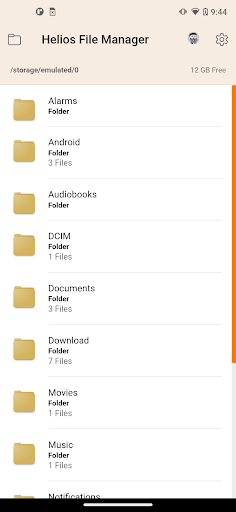
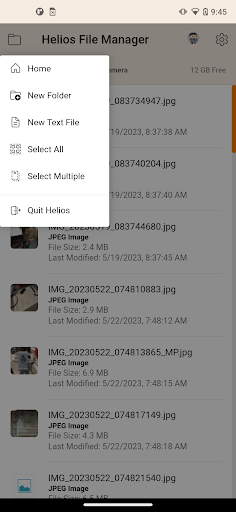
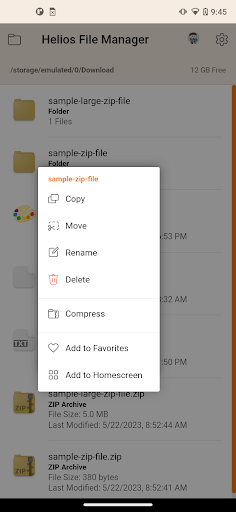
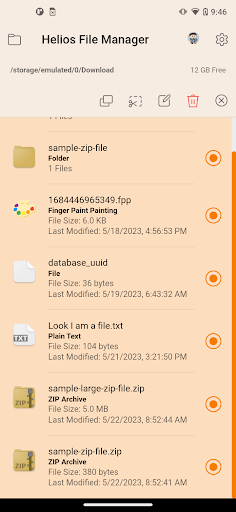
Helios is a comprehensive file manager that combines powerful features with a clean, intuitive interface. Whether you are a beginner or an advanced user, this tool simplifies file browsing, organization, and multitasking. It supports standard operations like copying, moving, deleting, and renaming, with batch processing for multiple files at once. Hidden files can be shown or hidden, and you can switch between list and grid views for optimal navigation.
Beyond basic management, Helios integrates with cloud storage services such as Dropbox, Google Drive, and Microsoft OneDrive, allowing you to send files directly to your favorite cloud accounts. The app also supports zip file extraction, letting you read and extract data from compressed archives right within the interface. For productivity, it includes a full-featured text editor for creating and editing txt, html, js, css, and xml files, complete with printing capabilities. Additionally, Samsung Multiwindow support enhances multitasking on compatible devices.
Helios offers convenient extras like image thumbnails, homescreen shortcuts to files or folders, and Noteastic note file creation. The app is designed to be flexible and user-friendly, with external SD card support and root directory access. As the developer continuously improves the application, user feedback is encouraged to help shape future updates. Helios aims to be the ultimate file management package for Android users.
Beyond basic management, Helios integrates with cloud storage services such as Dropbox, Google Drive, and Microsoft OneDrive, allowing you to send files directly to your favorite cloud accounts. The app also supports zip file extraction, letting you read and extract data from compressed archives right within the interface. For productivity, it includes a full-featured text editor for creating and editing txt, html, js, css, and xml files, complete with printing capabilities. Additionally, Samsung Multiwindow support enhances multitasking on compatible devices.
Helios offers convenient extras like image thumbnails, homescreen shortcuts to files or folders, and Noteastic note file creation. The app is designed to be flexible and user-friendly, with external SD card support and root directory access. As the developer continuously improves the application, user feedback is encouraged to help shape future updates. Helios aims to be the ultimate file management package for Android users.
Screenshots
Download Helios File Manager
No builds here yet
No builds yet. Upload yours first and earn from every download — it's easier than you think.

PRO Modder
Bubalex88
168
Builds
13
Subscribers
6
Level

PRO webdev
Shaman[Dev]
76
Builds
8
Subscribers
3
Level

PRO Modder
SliderEXE
13
Builds
0
Subscribers
1
Level
PRO Modder
A.F
4
Builds
0
Subscribers
0
Level

Modder
XaView
1
Builds
0
Subscribers
0
Level

User
JoelDroid
2
Builds
0
Subscribers
0
Level
User
user_908973
2
Builds
0
Subscribers
0
Level
User
Shiro & K
1
Builds
0
Subscribers
0
Level
{%lang-empty-page%}
{%lang-empty-page-text%}
{%lang-empty-page-text-2%}
Tech info
Updated
-----
Version
4.0.0 (71)
CPU
Minimum Android version
26
Size
63.62 MB
OpenGL
----
Downloads
12
Developer
Brandon Stecklein
Views today
2